Invoices and proforma invoices are documents used to request payment. ReFIS distinguishes between an issued and a received invoice and between an issued and a received proforma invoice. In ReFIS, every invoice line is an invoiced amount, which you then match with payments.
You add an invoice in the Documents module with the “Add issued invoice” or “Add received invoice” function (a proforma invoice in the same way). If you have an older document selected in the list, the form is prefilled from it - this way you issue, for example, a recurring invoice with the same customer and items. Received invoices most often arrive through unprocessed documents.
Invoice and proforma invoice
- An invoice is a tax document.
- A proforma invoice has the particulars of an invoice but is not a tax document. A company issues it when it wants to be paid first and only then issue an invoice - for example, for an advance payment.
If the customer pays a proforma invoice before the goods or service are delivered, a VAT registered company in some countries - for example Slovakia and the Czech Republic - must issue a tax document for payment for the payment received.
Form
Apart from the number, dates and amounts, the form contains in particular:
- “Issued for” or “Received from” - a person from the address book
- “Due date” - ReFIS prefills it according to the due date of the person, or of your own company, and shifts it when the date of issue changes
- “Payment method” and account - on an issued invoice the company's main account is the default
- payment symbols - for companies from Slovakia and the Czech Republic the variable, constant and specific symbol, elsewhere only “Payment reference”
- “Order / Contract” - related documents; with the “From pur. order/contract” button you take over their amounts
- “Other settings” - contact person, buyer reference and payment terms
- on a received invoice, “Date of receipt” and, depending on the settings, also the fulfillment period
Along with the document type, there can also be an extended document type, which the company defines itself - for example a debit note or an invoice abroad.
ReFIS generates the number of an issued invoice according to the number series. You enter the number of a received invoice; it must be unique for the same person.
An issued invoice carries a QR code for payment according to the customer's country - PAY by square in Slovakia, QR platba in the Czech Republic, and the SEPA QR code of the Single Euro Payments Area in other countries. You send an issued invoice by e-mail, by post or via Peppol; you see it as an e-invoice in the preview next to the form while you are still filling it in.
Credit note and debit note
- A credit note is an invoice with a negative total. You enter a discount on an amount or on the whole invoice as a negative line. You assign the original invoice to the credit note with the “Assign invoice: Credited” button. For a received e-invoice that refers to the original invoice, ReFIS assigns it itself.
- A debit note increases the originally invoiced sum - for example, when a price goes up. For ReFIS it is an ordinary invoice, which you can mark with an extended document type.
Advance invoice and settlement invoice

So that the cash flow reports and income and expenditure by labels do not show the same sum twice, each invoiced amount is recorded only once. In the settlement invoice you therefore assign the advance invoice or proforma invoice with the “Assign invoice: Advance invoice” button and enter only the new amounts.
The amounts of the advance invoice are shown in the settlement invoice, and you can change both their sum and their VAT rate - for example, when the proforma invoice did not state VAT. The change is saved directly to the amount of the advance invoice.
Example 1: a company receives a proforma invoice for 120 EUR without VAT, pays it, and then receives a settlement invoice for 120 EUR including VAT. When entering the settlement invoice, it assigns the proforma invoice as an advance invoice and adds the VAT rate. There is no need to match the settlement invoice with the advance invoice.
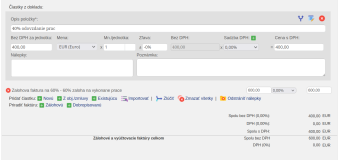
Example 2: a company agrees on 1,000 EUR - 60% at the start of the work, 40% after acceptance. It receives an advance invoice for 600 EUR and pays it. After completion it receives a settlement invoice that shows the full 1,000 EUR and deducts the advance payment. When entering it, the company assigns the advance invoice, so the settlement invoice will have only one new amount of 400 EUR.
Example 3: the advance invoice has one amount, the settlement invoice has many amounts, and the company cares about how they are broken down, for example by project. In that case:
- when entering the settlement invoice, assign the advance invoice,
- if the advance invoice has already been paid, unmatch the payment from it and match it with the settlement invoice,
- mark the advance invoice as closed and remove its labels.
You can also turn a proforma invoice into an invoice with the Bulk document creation function - the amounts of the proforma invoice are then used in the invoice, and no new ones are created.
Invoice as a delivery note
An invoice can also serve as a delivery note - you tick “This invoice also serves as a delivery note” and fill in who handed over or received the products. “Delivery address” states where the goods were delivered or where the service was performed.