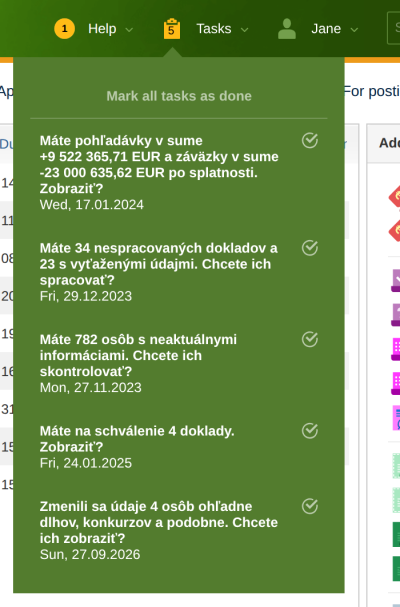
The Tasks menu at the top right shows what is waiting for you in ReFIS: documents to approve, unprocessed documents, overdue receivables and the like. The number by the icon is the number of tasks. The list of tasks appears when you move the mouse over the menu, and clicking a task opens the screen on which you deal with it.
Which tasks ReFIS creates
You see a task only if you have access to the screen it leads to.
| Task | When it appears | Clicking it opens |
|---|---|---|
| “You have … documents to approve. View?” | it is your turn to approve at least one document; “… more out of turn” are documents whose turn has not come yet | the list “My documents for approval” |
| “You have … unprocessed documents. Do you want to process them?” | there are documents in the Unprocessed documents module; “with extracted data” are those from which ReFIS has already read the data | the Unprocessed documents module |
| “You have … unread messages. Read them?” | you have unread messages | received unread messages |
| “You have receivables in the amount of … and liabilities in the amount of … overdue. View?” | the company has unpaid receivables or payables past their due date | the Receivables and payables report |
| “Invoices for … persons must be issued, totaling …” | there are amounts to be invoiced | the What to invoice report |
| “You have … people with outdated information. Do you want to check them?” | the data of persons in the address book differ from the public registers | a check of the persons one by one |
| “Information regarding debts, bankruptcies, etc. of … persons has changed. Do you want to view it?” | data on the debts of persons from the address book were added or changed in the public registers | these persons in the address book |
| “… people's ID cards are about to expire. Do you want to edit them?” | the ID card of a person in the address book expires within 3 months or has already expired | these persons in the address book |
| “… is about to expire.”, “… has expired.” | access to a bank's API (Tatra banka, Česká spořitelna, Raiffeisenbank CZ) expires within 14 days or has already expired | the statement import from that bank |
When tasks change
ReFIS does not recalculate tasks with every click, but after you log in and every morning. When you deal with a task, it disappears from the list only at the next recalculation. The number of documents to approve is recalculated only after you log in.
With the icon by a task (“Mark this task as completed”) you remove the task from the list, “Mark all tasks as done” removes all of them. A task comes back when what it reports changes at a recalculation - for example when another unprocessed document arrives.
Documents to approve and messages are your own tasks. The other tasks are shared by all users who have access to them: when you mark them as done, they disappear for the others too.
E-mail notifications
ReFIS can also send you e-mails about tasks. You switch them on in your settings (by clicking your name at the top right) in the “Notifications” section, separately for each type of task. The e-mail arrives when the task is created and, until you deal with it or mark it as done, at most once a week as a reminder. About documents to approve ReFIS sends separate e-mails.
Purchase request
If you added products to a purchase request with the “Add to purchase request” function in the product list, “Purchase request” appears at the top right instead of “Tasks”. When you move the mouse over it, it shows the products in the unfinished purchase request and below them the tasks. Clicking a product opens the purchase request, in which you adjust the quantities and finish it with the “OK, request” button.