E-mail notifications for approval process alert you when it is your turn to approve a document, when someone rejects it, or when it has been finally approved.
Setting up notifications
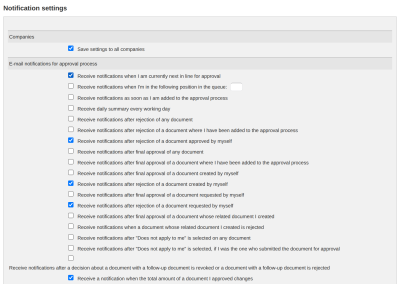
You set up notifications in the menu Other → User → Notifications, in the “E-mail notifications for approval process” section. Signing, processing and voting have their own sections, and you will find other notifications about documents in the “Other e-mail notifications for documents” section.
If you work in several companies, the “Save settings to all companies” option is ticked by default. When you save, all notification settings are then also saved to the other companies where you have an account. If you want to change the settings only in the current company, you untick it before saving.
For approval you can choose when you receive an e-mail:
- when it is your turn right now, or when you reach a chosen place in the order
- as soon as you are added to the approval
- “Receive daily summary every working day” - one e-mail with all documents where it is your turn. If you have no such document, no e-mail is sent. The time of sending depends on the ReFIS settings, usually in the morning.
- after a document is rejected - any document, one where you are included, one that you approved, created or requested, or one whose related document you created
- after a document is finally approved - any document, one where you are included, one that you created or requested, or one whose related document you created
- after “Does not apply to me” is selected - for any document, or only if you added the approver
- after a decision is revoked or a document is rejected from which a follow-up document has already been created
You will find the notification that the total amount of a document you have already approved has changed - for example, when someone corrects the sum of an invoice after your approval - in the “Other e-mail notifications for documents” section.
You see some options only if you have the right to see the documents concerned - for example, rejected documents.
The e-mail contains a link directly to the document on the “My documents for approval” tab. External participants (a person from the address book or an e-mail address) receive e-mails automatically and approve the document with a button directly in the e-mail, without logging in to ReFIS.
Default settings
As a new user, you have these approval notifications turned on:
- when it is your turn right now
- after a document that you approved, created or requested is rejected
- after “Does not apply to me” is selected, if you added the approver
In addition, you have the notification about a change in the total amount of a document you approved turned on. You will find it in the “Other e-mail notifications for documents” section.
For signing, processing and voting you have these notifications turned on:
- signing - when it is your turn and when signing starts
- processing - when it is your turn and when you are added to processing
- voting - when it is your turn and when voting starts
You turn on the other options yourself.
Settings for several people at once
A company administrator sets up notifications for several colleagues at once in the Address book module: they select the persons and use the “Set notifications” function (they need the right to edit users). An option that is left unchanged does not change for those people. The notification by place in the order cannot be set this way.
Deputies
If someone stands in for you, they receive, according to your settings, separate e-mails “on behalf of” you and a copy of the e-mails about rejection.