With a delegation you designate a colleague who approves and processes documents instead of you during your absence - for example a vacation.
Setting up a delegation
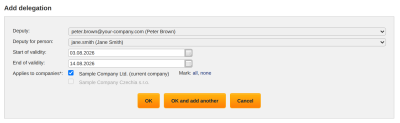
You find delegations in the menu Other → User → Delegations. With the function “Add delegation” you enter:
- “Deputy” - only users who have the right to act as a deputy in approval are offered
- “Start of validity” and “End of validity” - both dates are optional; without them the delegation applies indefinitely. The last day of validity is included.
- “Applies to companies” - if you have access to several companies; you can choose a company only if the deputy has the right to act as a deputy in it and the person being represented has an account there
A user with the right to change other people's delegations also enters, in the field “Deputy for person”, a delegation for another colleague - for example an administrator for an employee who unexpectedly fell ill.
You can also have several deputies for one period. ReFIS only warns about overlapping delegations.
Approving as a deputy
As a deputy you find the documents in the Documents module in the tab “On behalf of”. The tab is shown only if you are currently deputizing for someone. You select whom you are approving for in the field “Deputy for”. You approve the documents the same way as your own - in the approval window you see whom you are deciding for, and instead of “Does not apply to me” you have “Does not apply to …”. ReFIS adds “(on behalf of …)” to the note.
You can deputize in approving and processing. Nobody can sign or vote for someone else.
The deputy's decision is valid as if the represented person had decided, and the document appears in the tab “Processed by me” for both of them.
E-mails to the deputy
The deputy receives the e-mails that the represented person would receive - for example that it is the document's turn, or the daily summary - as a separate e-mail with the addition “on behalf of” in the subject. Which e-mails these are is governed by the represented person's notification settings. The deputy receives e-mails about the rejection of a document in copy.