A bank statement is a document that links the payments on an account for a certain period with the statement from the bank. Payments most often get into ReFIS by importing a statement from online banking; ReFIS creates the statement by itself during the import.
Importing a bank statement
You find the import in the menu Other → Import and export, in the tree under the “Payments” item. Depending on the bank, the following are available:
- Import via API - ReFIS downloads the payments from the bank by itself, regularly
- Import from e-mail mailbox - the bank sends statements by e-mail and ReFIS reads them from the mailbox
- Import from disk or Import from file - you upload the statement file manually
The accounts you import from must be entered in the menu Other → Code lists → Bank accounts and the bank in the Banks list.
| Bank | Import options |
|---|---|
| Česká spořitelna | via API |
| Citi Bank | from disk, from e-mail mailbox |
| ČSOB | from disk (SLK format) |
| Fio banka | via API - you just insert the token from the Fio banka internet banking |
| mBank | from disk (CSV) |
| Prima banka | from disk (XML), from e-mail mailbox |
| Raiffeisen BANK CZ | via API |
| Slovenská sporiteľňa | from e-mail mailbox |
| Tatra banka | via API, from disk (XML), from e-mail mailbox (B-Mail), from e-mail mailbox (CardPay) |
| UniCredit bank | from disk (CSV), from e-mail mailbox |
| VÚB banka | from disk (XML), from e-mail mailbox |
You can import a statement in the CAMT.053 format (XML), which most European banks provide, from a file or from an e-mail mailbox regardless of the bank. The MultiCash system is supported too. Import of statements from Omega Kros is also available on request.
Import via API
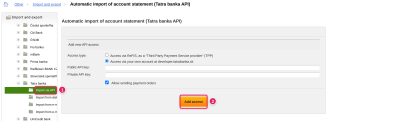
For Tatra banka you choose the access type: “Access via ReFIS, as a "Third Party Payment Service provider" (TPP)”, or “Access via your own account at developer.tatrabanka.sk”, for which you enter the public and private API key. With the “Add access” button you then select in the bank the bank accounts to which you allow ReFIS access. Access is valid for 180 days; after that you renew it with the “Update access” function. If you also need the Tatra banka API for other applications, you register at developer.tatrabanka.sk and choose access via your own account - Tatra banka API settings. Through the Tatra banka API you get access to payments in these banks: Tatra banka, Raiffeisen BANK, Slovenská sporiteľňa, Všeobecná úverová banka, Československá obchodná banka, Fio banka, UniCredit Bank Czech Republic and Slovakia, Air Bank, Česká spořitelna, Komerční banka.
What the import creates
- Payments - every movement on the account. Until ReFIS recognizes the person, the payment belongs to an unspecified person.
- Bank statement - one for each account and calendar month; the statement file is its attachment.
After the import, ReFIS shows the list of imported payments. You cannot import a file with the same name a second time.
ReFIS tries to determine the person of the payment by the counter-account number in the address book, or by the variable symbol or payment reference together with the amount of an unpaid invoice.
Rules for import of payments
Payments are matched with invoices by the rules for import of payments. You find them in the menu Other → Tools → Rules for import of payments. A rule compares a payment detail - for example the variable symbol, the payment reference or the counter-account number - with document data and performs an action, for example “match with unpaid amounts of that invoice or proforma invoice” or “assign a person”. A rule can also mark payments with labels and be limited to selected accounts.
Variable, constant and specific symbols are used only for companies from Slovakia and the Czech Republic; elsewhere the rules work with the payment reference.
If the company has “After saving a document, match unmatched payments using the rules for import of payments” switched on in the menu Other → Settings → Document settings, ReFIS also matches payments when an invoice that arrived in ReFIS only after the payment is saved.
Statement added manually
You can also add a statement with the “Add bank statement” function in the Documents module. You enter the bank, the bank account, the period (“Statement from”, “Statement to”), the opening and closing balance, and you assign to the statement payments that are already in ReFIS. No new payments are created this way.