Retention is the part of an invoice amount that the customer pays later than the rest of the invoice - for example 5 % of the value of the work, payable only after the warranty period has expired. ReFIS splits an invoice with retention into several payment parts, each with its own due date, and payments, payment orders and reminders then track each part separately.
Retention works for both issued and received invoices.
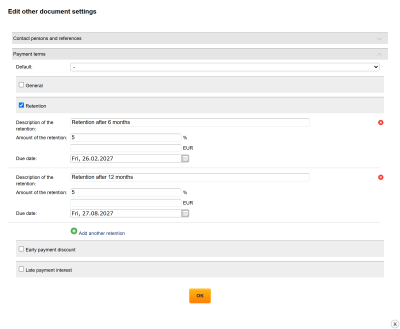
Entering retention
You enter retention in the invoice form: with the edit icon next to the line “Other settings” you open the window “Edit other document settings”, tick “Retention” in the section “Payment terms” and enter the following for each item:
- “Description of the retention” - shown on the invoice in PDF and in the e-invoice
- “Amount of the retention” - as a percentage or as an amount (fill in only one of them)
- “Due date” - the date on which the retention is due
With the function “Add another retention” you add another item, for example 5 % due in half a year and another 5 % in a year. Retention that you use repeatedly can be saved as a template in the code list Payment terms.
On an invoice that you can no longer edit, for example an approved one, you change the retention with the function “Edit payment terms” in the document detail, if you have the right to it. ReFIS applies the change to the invoice payment immediately after saving.
Retention for selected amounts only
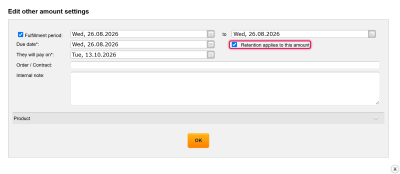
By default, retention applies to the whole invoice and the percentage is calculated from the total invoice amount including VAT. If it should apply only to some amounts, for example only to construction work and not to materials, you open the amount settings in the invoice form. The field “Retention applies to this amount” is ticked there for every amount; for amounts the retention does not apply to, you untick it. The percentage is then calculated only from the sum of the amounts with retention, and the other amounts are due in full on the due date of the invoice.
The field is displayed only if the invoice has retention entered in its payment terms. An amount that you add to the invoice later is automatically included in the retention when the retention applies to the whole invoice; when the retention applies only to some amounts, it does not apply to it until you tick its field.
In the invoice detail, below the payment terms, it says whether the retention applies to the whole document or to which amounts.
Payment of an invoice with retention
The content of the invoice does not change because of retention - the invoice lines, their labels, VAT and projects stay as you entered them, and that is how accounting exports receive them. ReFIS, however, splits the payment of the invoice into separate amounts:
- one amount with the sum without retention and with the due date of the invoice
- one amount for each retention item, with its amount and its due date
Example: an invoice for €12,500 with a retention of 5 % due in half a year and another 5 % due in a year has three payment amounts:
- €11,250 due on the due date of the invoice
- €625 (5 %) due in half a year
- €625 (5 %) due in a year
Everything related to payment works with these amounts:
- the reports “What to pay?”, To whom to send a reminder notice? and Receivables and payables show the retention with its own due date, so it is not overdue together with the rest of the invoice
- a payment order has a separate line for each part
- each part has the date “We will pay on” according to its due date
You match the amounts of an invoice with the amounts of other documents with the function “Edit matching” in the document detail, in the function group “Labels and matching” (if you have the right to it). For an invoice with retention, the amounts in the field “Amount on the document” are divided into two groups:
- “Document amounts” - invoice lines; you match them with amounts from an order or a contract
- “Document payment” - payment amounts (one without retention and one for each retention); you match them with an invoiced amount of the opposite direction, that is, by mutual offsetting
When the invoice is paid, ReFIS also calculates the paid status of the individual invoice lines the retention applies to, in proportion to the paid part of their total. Lines the retention does not apply to have their own paid status.
If you change or cancel the retention on an invoice that already has matched payments, ReFIS matches them again with the new payment amounts, each at most in the same amount as before. If a payment amount is reduced, the rest of the payment stays unmatched.
Retention on the invoice
On the invoice in PDF, below the invoice total, there is a list of retentions. Each line starts with the description that you entered and continues with the amount, for example “Retention amounting to 5 % of the invoice” (if you named the description “Retention”); for retention only on some amounts it is followed by “of the amount: …” or “of the amounts: …” with a description of the amounts. After the list there is the line “Total without retention” and, when printing with the unpaid amount, also “Amount due without retention”.
In an e-invoice, the retention is in the text of the payment terms - description, amount and due date.
You find an overview of retention on all documents in the Documents module, in the menu Tools → Payment terms (also on the dashboard in the section “What to invoice or pay?”). Templates of payment terms are elsewhere - in the menu Other → Code lists → Payment terms.