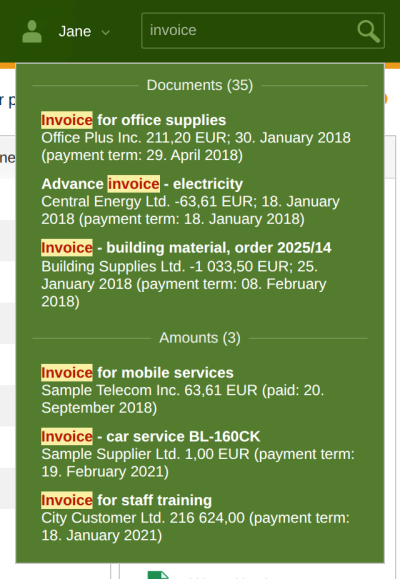
With full-text search in the “Search for...” field at the top right you find documents, amounts, persons and other records across the whole of ReFIS at once, without knowing which module they are in. You move the cursor to the field with Ctrl+S.
Results appear while you type, grouped by where they were found. Each group shows the number of records found, at most 20 of them are displayed. The searched words are highlighted in the results. When you hold the mouse over a result, ReFIS shows its details, and clicking it opens it. You can also move between the results with the arrow keys and open them with Enter.
What is searched
You see each group only if you have access to its module.
| Group | Searched in |
|---|---|
| Documents | document number, registration and external number, variable, constant and specific symbol, payment reference, document description, descriptions and labels of its amounts, numbers of related documents, name, company ID, tax ID and VAT ID of the external person; bank statements are not searched |
| Amounts | payments and amounts that are not on any document (you find amounts on a document through the document): symbols, description, labels, person, bank account number, payment card, cash desk |
| Address book | name, company ID, tax ID, VAT ID, e-mail, web, phone, bank account numbers |
| Projects | code, external code, name and description of the project |
| Labels | code, name and owner of the label |
| Bank accounts | number, name, bank and currency of the account |
| Cash desks | code, name, currency and responsible user |
| Employees | name, e-mail, user name and positions |
The search does not cover amounts of money, the text of attachments, or time entries and products. It also finds cancelled and inactive records. Only the company you are currently working in is searched. A new or changed record appears in the search within a few minutes.
How ReFIS searches
- A search word must have at least 3 characters; ReFIS leaves out shorter words.
- Diacritics do not matter, “faktura” also finds “faktúra”.
- With several words it is enough for a record to contain one of them. Records that contain more of the searched words are higher.
- The last word is also searched as the beginning of a word (“invo” finds “invoice”); the other words must be whole.
- ReFIS treats characters such as a full stop, comma, hyphen or slash as a space.
Semantic search
If the company has semantic search enabled, ReFIS also finds records that do not contain the searched word but belong to it by meaning - for example for “telephone” also invoices for mobile services. Records found both ways are higher in the results.
Whether you want to use semantic search you choose in your settings (by clicking your name at the top right) in the “Search mode” field: “Full-text and semantic” or “Full-text only”.