With the import of documents from a network drive ReFIS takes over documents saved there, for example, by a network scanner or another system - either as new unprocessed documents, or as attachments to the document you are just adding.
Unprocessed documents from a drive or from another system
ReFIS regularly takes over files from a network or local drive, a shared folder, over SFTP, WebDAV and the like, and creates a document from each file in the Unprocessed documents module. In the same way it takes over documents from other systems it is connected to, for example via an API - orders, goods receipts and invoices from dealer and other systems.
You then process such a document the same way as a document that came by e-mail.
Attachments to a new document by its number
If the scanner saves files with the document number in the name, for example Scan-2024001.pdf, ReFIS finds and attaches them by itself when you add the document:
- Add the document and fill in “Registration number” or “Ext. acc. number”.
- Below the form ReFIS shows the files from the network drive that belong to the number, with the text “Read for registration number: …” or “Read for ext. accounting number: …”.
- Save the document. ReFIS attaches the files it found; the files stay on the network drive.
The “Registration number” field is in the form if the company has “Keep a registry log (line number)” switched on in the menu Other → Settings → Document settings, the “Ext. acc. number” field if “Show external accounting number” is switched on.
Settings
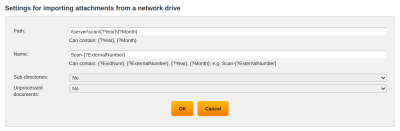
You set where to look for the files in the menu Other → Import and export → Import attachments from a network drive:
- “Path” - the folder on the network drive. It can contain {?Year} and {?Month} - the year and month of the document's receipt date, for example \\server\scan\{?Year}\{?Month}.
- “Name” - the beginning of the file name. It can contain {?EvidNum} (registration number), {?ExternalNumber} (external accounting number), {?Year} and {?Month}, for example Scan-{?ExternalNumber}. All files whose name begins this way are attached.
- “Sub-directories” - whether ReFIS also searches subfolders.